

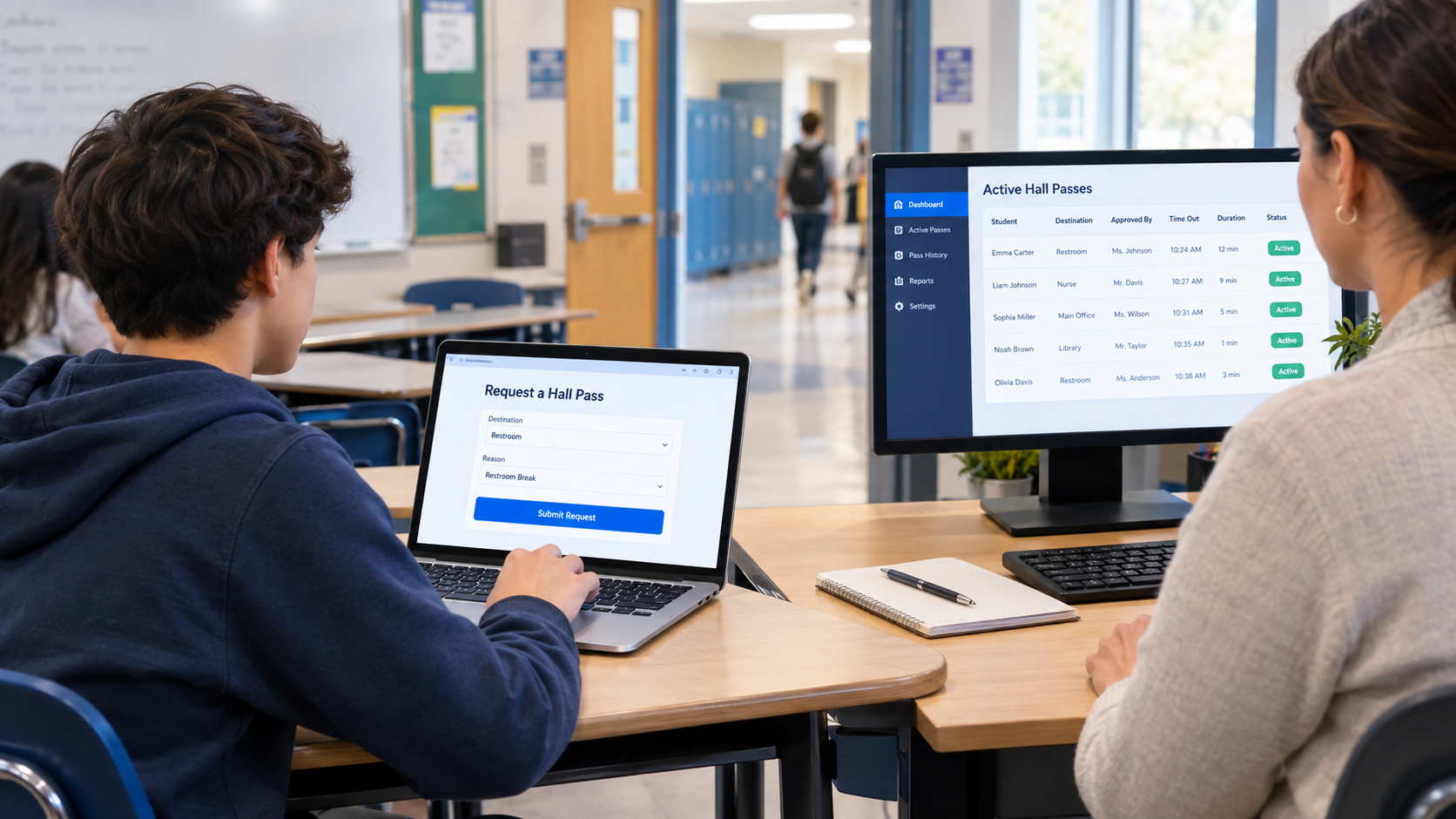
If you have searched for e hall pass, you are probably looking for information about the digital system schools use to manage student movement outside the classroom. Instead of relying on paper slips, sign-out sheets, or physical passes, an electronic hall pass allows students to request permission digitally while teachers and administrators manage those requests through a dashboard.
Today, digital hall-pass systems can do much more than simply approve a bathroom visit. Depending on the school and software configuration, they can record destinations, monitor active passes, apply student or location limits, support appointment passes, provide reports, and help staff understand who is out of class. Securly Pass, for example, provides a digital hall-pass system with live dashboards, pass limits, location controls, appointment passes, reporting, and kiosk options.
This guide explains what e hall pass means, how an electronic hall pass works, how students use it, what teachers can see, its benefits and limitations, privacy considerations, and common questions about logging in and using a digital pass.
What Is an E Hall Pass?
An e hall pass is an electronic version of a traditional school hall pass. It allows a student to request permission to leave a classroom through a website, app, school device, or shared kiosk instead of receiving a physical paper pass.
The basic process is straightforward:
- A student requests a pass.
- The teacher or authorized staff member reviews the request.
- The request is approved or denied.
- If approved, the student leaves class for the authorized destination.
- The pass remains active while the student is away.
- The student ends the pass after returning.
Securly’s student guide describes the process as requesting a pass, waiting for teacher approval, keeping the pass active while away, and ending it after returning to class.
The term e hall pass can also be used more generally for any electronic hall-pass system. However, specific products may have their own names, features, login processes, and school policies.
E Hall Pass at a Glance
| Feature | Traditional Hall Pass | E Hall Pass |
|---|---|---|
| Pass format | Paper or physical item | Digital |
| Request method | Verbal or written | Online request |
| Teacher approval | Usually verbal/manual | Digital approval |
| Activity record | Often limited | Digital record |
| Active-pass visibility | Limited | Dashboard-based |
| Pass limits | Manual | Can be configured |
| Reporting | Difficult | Digital reports may be available |
| Shared kiosk option | Not applicable | Available in some systems |
How Does E Hall Pass Work?
An electronic hall pass turns a simple classroom procedure into a digital workflow. The exact steps can vary between schools, but the overall process is usually similar.
1. Student Requests a Pass
The student opens the school’s approved hall-pass system on a compatible device or uses a designated kiosk if the school provides one.
The student may be asked to select information such as:
- Destination
- Teacher or starting location
- Type of pass
- Reason for leaving
- Other information required by school policy
Securly Pass documentation states that students can request passes from a school device or their own device, while kiosk and proxy options can be used when a student does not have a device.
2. Teacher Reviews the Request
The teacher receives or sees the request through the system.
The teacher can approve or deny the request according to classroom rules and school policies. Digital approval can reduce the need to interrupt a lesson to handle paper passes.
3. Student Leaves the Classroom
Once the pass has been approved, the student can leave the classroom according to the school’s rules.
The digital record helps authorized staff understand which students currently have active passes.
4. The Pass Remains Active
The system can record how long the pass remains active. Some platforms also apply rules concerning destinations, time limits, student limits, or other restrictions.
For example, Securly Pass provides a live dashboard showing active passes, destinations, students, and how long passes have been active.
5. Student Returns and Ends the Pass
After returning to class, the student ends the pass according to the school’s procedure.
This creates a clearer record of when the student’s hall movement began and ended.
What Can Teachers See on an E Hall Pass?
One of the main reasons schools use digital hall passes is visibility.
Instead of relying entirely on memory or paper records, authorized staff can use a dashboard to see active passes and related information.
Depending on the system and the school’s configuration, teachers or administrators may be able to see:
- Which students are currently out of class
- The destination selected for a pass
- Who approved the pass
- How long the pass has been active
- Whether a pass is still active
- Pass history or reports
- Certain restrictions or alerts
Securly says its Pass dashboard can show active hall passes, destinations, students, and the amount of time students have been out of class.
Importantly, seeing a digital pass does not necessarily mean the system uses GPS to follow a student. Securly specifically states that Pass does not use GPS or track the physical location of students or devices; it records pass-related information such as destination, time, and approval.
E Hall Pass Features
Digital hall-pass systems vary, but modern platforms can include considerably more functionality than a simple electronic permission slip.
Digital Pass Requests
Students can submit requests electronically rather than waiting for a paper pass.
This creates a standardized process and gives staff a digital record.
Live Dashboard
A live dashboard can allow authorized staff to see active passes and identify students who are currently recorded as being outside the classroom.
Student Pass Limits
Schools can configure limits for individual students, groups, grade levels, or the wider school, depending on the platform.
These limits can help schools implement their own policies rather than treating every student and situation identically.
Location Controls
Some systems allow administrators to restrict or manage access to particular destinations.
For example, Securly Pass includes location pass limits designed to prevent students from requesting access to rooms that are unavailable or already full.
Appointment Passes
An appointment pass can be useful when a student needs to meet a counselor, teacher, administrator, or another authorized person.
Securly Pass includes appointment scheduling and reminders as part of its platform.
Pass Kiosk
Not every student will necessarily have a device available at every moment.
A kiosk can provide a shared location where students can request or check in with a digital pass. Securly specifically describes kiosk use for locations such as cafeterias, gyms, and other areas where students may not have individual devices.
Proxy Pass
A proxy option allows staff to create a pass on behalf of a student.
This can be useful when a student forgets a device or when a school is operating without student devices.
Reporting
Digital records can make it easier for administrators to analyze pass activity and identify patterns.
Depending on the software, reports may include information about pass volume, destinations, students, and other activity.
E Hall Pass vs. Traditional Paper Pass
The biggest difference is the way information is recorded and managed.
| Category | Paper Hall Pass | E Hall Pass |
|---|---|---|
| Request | Usually verbal/manual | Digital |
| Approval | Teacher approval | Digital approval or configured automation |
| Record keeping | Often manual | Electronic |
| Visibility | Usually limited to nearby staff | Can be available through dashboards |
| Reporting | Time-consuming | Digital reporting may be available |
| Restrictions | Mostly manual | Can be configured |
| Device requirement | None | Depends on system; kiosks/proxy options may exist |
| Setup | Very simple | Requires school technology and configuration |
Neither approach automatically guarantees better results. A digital system still needs sensible school policies, appropriate implementation, teacher participation, and respect for student needs.
Benefits of Using an E Hall Pass
1. Better Visibility
One of the strongest advantages is that authorized staff can more easily see which students have active passes.
This can be particularly useful when many students are moving around a large campus.
2. Less Paperwork
Digital requests reduce dependence on paper slips and handwritten records.
This can make the process easier to standardize across classrooms.
3. Clearer Accountability
A digital record can show information associated with a pass, such as its destination, approval, and duration.
That can make it easier to review what happened when questions arise.
4. More Consistent Rules
Schools can configure rules around pass limits, destinations, and other conditions instead of relying entirely on individual paper procedures.
5. Useful Administrative Reports
Digital records can help administrators identify patterns in pass activity.
For example, a school may be able to identify frequently used destinations or unusual pass patterns and then review whether its policies need adjustment.
6. Support During Emergencies
A live list of active passes can help authorized staff understand which students are recorded as being outside their classrooms.
Securly specifically positions its Pass dashboard as a tool for accounting for students during emergencies.
What Are the Limitations of an E Hall Pass?
Digital systems are useful, but they are not perfect.
Technology Dependence
A school needs compatible devices, accounts, connectivity, and functioning software. Technical problems can interrupt the normal process.
Privacy Considerations
Schools should understand what information is collected, who can access it, how long it is retained, and how the provider protects it.
Students and parents may reasonably have questions about digital movement records.
Policy Still Matters
Technology cannot replace good judgment.
A digital system can record a pass, but teachers and administrators still need to consider legitimate student needs, emergencies, accessibility requirements, and individual circumstances.
Potential for Overuse
If pass controls are configured too aggressively, students may find the system frustrating. Schools need to balance accountability with reasonable access to bathrooms, health services, counseling, and other necessary destinations.
Does E Hall Pass Track Your Location?
Not necessarily. A digital hall-pass system can record your selected destination and pass activity without using GPS.
For Securly Pass specifically, the company states that it does not use GPS or track the physical location of students or devices. Instead, it records pass information such as destination, time, and approval.
This distinction is important.
A system may know that a student has an active pass to the nurse without continuously determining the student’s physical coordinates.
However, privacy practices differ between products, so students and schools should check the documentation and privacy policy for the particular system they use.
How to Use E Hall Pass as a Student
If your school uses a digital hall-pass system, follow the school’s instructions first. A typical workflow looks like this:
- Open the school’s hall-pass website or app.
- Sign in using the account provided by your school.
- Choose the appropriate pass or destination.
- Submit your request.
- Wait for teacher approval if approval is required.
- Leave the classroom only after permission is granted.
- Keep the pass active while you are away.
- Return to class.
- End the pass according to your school’s instructions.
Do not assume that a submitted request means you are automatically allowed to leave. School policies can require teacher approval before the student leaves.
E Hall Pass Login: What Should You Do If You Cannot Sign In?
If you cannot access your e hall pass account, avoid repeatedly guessing passwords or creating an unofficial account.
Try these steps:
Check Your School Account
Make sure you are using the account or sign-in method provided by your school.
Check the School’s Instructions
Your school may use a specific login page, single sign-on system, or student portal.
Check Your Internet Connection
If the system is browser-based, a connection problem can prevent the page from loading correctly.
Ask a Teacher or School Administrator
If the problem continues, your teacher, technology department, or school administrator is usually the appropriate source of help.
Securly also maintains a dedicated support area for Pass, including documentation about system requirements, mobile access, login verification, limits, and appointments.
Common Mistakes Students Should Avoid
Using a digital hall pass is simple, but several mistakes can create problems.
Leaving Before Approval
Submitting a request is not necessarily the same as receiving permission.
Forgetting to End the Pass
If your school requires students to end passes after returning, forgetting to do so can leave the pass appearing active.
Selecting the Wrong Destination
Always choose the destination that matches your actual reason for leaving class.
Sharing Your Account
Do not give another student access to your school account simply so they can create a pass.
Ignoring School Policies
A digital system does not replace school rules. Follow the policies established by your teachers and administrators.
How Schools Can Implement an E Hall Pass Successfully
For schools considering digital hall-pass technology, implementation matters as much as the software itself.
A practical rollout can include:
- Define the school’s movement policy.
- Decide which destinations require passes.
- Establish reasonable pass limits.
- Train teachers and administrators.
- Explain the system clearly to students.
- Provide a solution for students without devices.
- Review privacy and data-management requirements.
- Monitor system performance after launch.
- Collect feedback from teachers and students.
- Adjust policies when the data shows a problem.
A school should also consider accessibility and exceptional circumstances rather than assuming every student can use the same procedure in every situation.
E Hall Pass: Key Facts at a Glance
| Question | Short Answer |
|---|---|
| What is e hall pass? | A digital system for requesting and managing permission to leave class. |
| Who uses it? | Primarily students, teachers, and school administrators. |
| Does it replace paper passes? | That is one of its main purposes. |
| Can teachers approve requests? | Yes, depending on the system and school configuration. |
| Can schools set pass limits? | Many modern systems support configurable limits. |
| Can students use a phone? | This depends on the school’s system and policy. |
| Is GPS always required? | No. Securly Pass says it does not use GPS. |
| Can schools use kiosks? | Some systems provide kiosk functionality. |
| Can administrators see reports? | Many digital hall-pass platforms provide reporting tools. |
E Hall Pass and Student Privacy
Privacy is an important part of any school technology system.
An electronic hall pass may process student information needed to operate the service. The exact information depends on the platform and the school’s configuration.
Securly says its Pass system uses basic school information such as student names and school email addresses, while some schools may also include information such as student ID numbers or grade level. It also states that data is encrypted and access is restricted to authorized users.
Schools should communicate clearly with students and families about:
- What information is collected
- Why it is collected
- Who can access it
- How long records are retained
- What security measures are used
- What privacy policies apply
Students should also use only official school accounts and approved devices or systems.
Is an E Hall Pass Better Than a Paper Pass?
For schools that need centralized visibility, digital records, configurable rules, and reporting, an electronic hall pass can offer significant advantages over paper.
However, “better” depends on the school’s needs.
A small school with simple procedures may have little need for advanced reporting. A large campus with many classrooms and frequent student movement may benefit more from a centralized digital system.
The goal should not simply be to replace paper with technology. The goal is to create a system that improves organization while maintaining reasonable student access, privacy, safety, and classroom efficiency.
Frequently Asked Questions About E Hall Pass
What is an e hall pass?
An e hall pass is a digital version of a traditional school hall pass. Students can request permission to leave class electronically, while teachers and authorized staff can approve requests and monitor active passes.
How does e hall pass work?
A student submits a digital pass request, a teacher or authorized staff member approves or denies it, and the student uses the approved pass according to school rules. After returning, the student may need to end the pass.
Can teachers see where students are going?
They can typically see the destination associated with an active pass if the system and school configuration provide that information. Securly Pass, for example, shows active passes and destinations through its dashboard.
Does e hall pass use GPS?
Not every digital hall-pass system uses GPS. Securly specifically states that its Pass product does not use GPS or track the physical location of students or devices.
Can I use e hall pass on my phone?
That depends on your school’s specific system and policy. Securly Pass supports access through compatible devices and also provides kiosk and proxy options for situations where students do not have individual devices.
What happens if I forget to end my hall pass?
The exact behavior depends on the system. Some platforms can automatically end or expire a pass after a configured limit. Securly says its Pass system can automatically end passes after a school-set time limit.
Why do schools use digital hall passes?
Schools can use them to improve visibility, organize student movement, reduce paper-based administration, apply pass rules, and maintain digital records of student movement.
What should I do if e hall pass is not working?
Follow your school’s backup procedure and tell your teacher or school technology administrator. Do not leave class simply because the digital system is unavailable unless your school’s policy allows it.